What is Malwarebytes and what does it do?
Malwarebytes: Modern Malware Protection with Real-Time Defense and Deep Removal
Malwarebytes is an anti-malware security program built to detect, block, and remove threats that can slip past traditional defenses. Instead of focusing only on known virus signatures, it emphasizes proactive protection, behavioral monitoring, and thorough removal. That makes it useful for modern problems such as spyware, browser hijackers, ransomware, potentially unwanted programs (PUPs), and malicious processes designed to run quietly in the background.
For many users, Malwarebytes fits into two common roles. It can act as primary protection for everyday browsing and file downloads, or it can run alongside another antivirus solution as an additional layer—especially when a system has a history of unwanted popups, suspicious redirects, or unexplained performance issues.
What Malwarebytes Is Designed to Do
The main purpose of Malwarebytes is straightforward: stop malicious activity early and remove infections completely. Malware today often spreads through deceptive downloads, compromised installers, malicious ads, phishing pages, and software bundles that sneak unwanted programs into the system. Once installed, these threats may attempt to disable protection tools, hijack browsers, steal data, encrypt files, or persist through system restarts.
Malwarebytes addresses this by monitoring system activity and identifying behavior that matches common attack patterns. This approach is especially important for newer threats where classic “known signature” detection may lag behind what attackers are currently using.
Real-Time Protection That Watches Processes
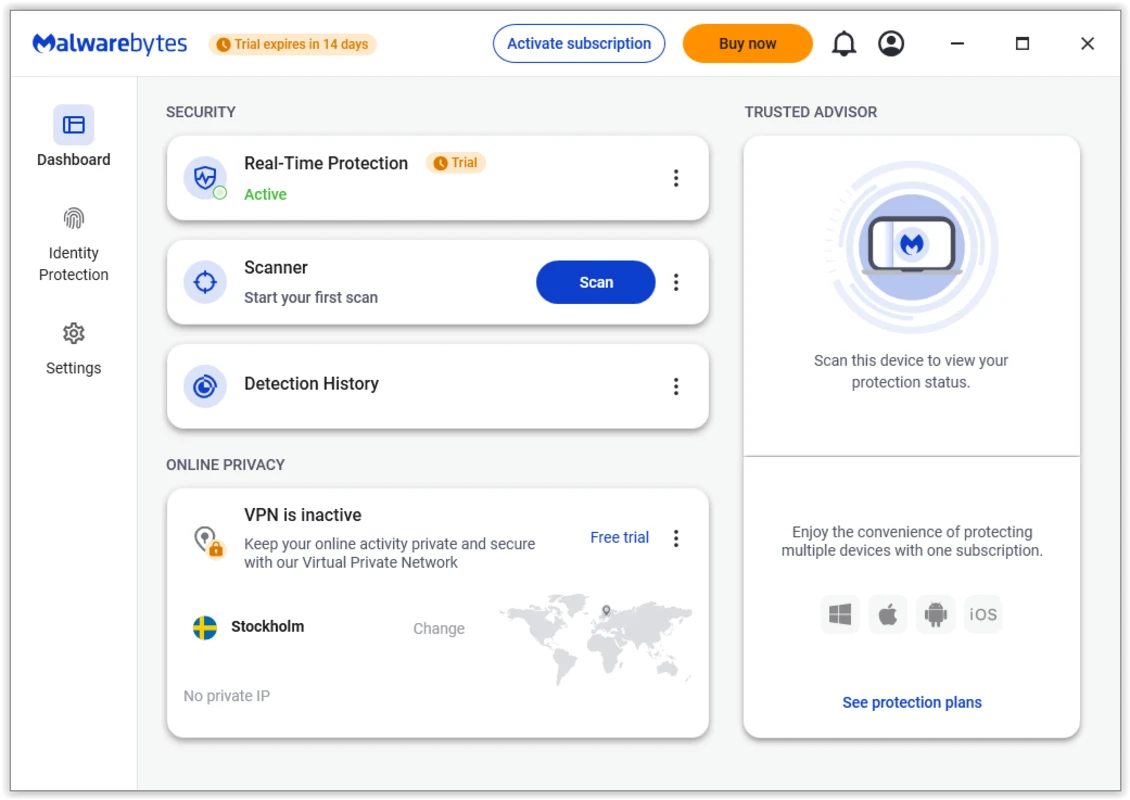
One of the strongest advantages of Malwarebytes is real-time protection. It monitors activity at the process level and can stop suspicious programs before they complete harmful actions. This is valuable because many modern attacks move quickly—by the time a traditional scan runs, the damage may already be done.
Real-time protection is commonly used to help defend against:
- Ransomware behaviors such as rapid file encryption
- Malicious scripts that attempt to persist or disable security settings
- Browser hijackers that alter search, extensions, or homepage settings
- Threats that try to inject code into legitimate system processes
Deep Malware Removal and Cleanup
Detection is only half the job. Cleanup matters because many threats leave behind scheduled tasks, registry entries, hidden services, or browser components that cause reinfection. Malwarebytes is positioned as a tool that removes malware thoroughly, not just partially. This includes malware families such as trojans, spyware, adware, and rootkit-style persistence techniques that make removal difficult.
For users who have dealt with repeating popups, unwanted toolbars, suspicious browser redirects, or “it came back after restart” infections, removal quality is often the deciding factor when choosing a security tool.
Protection Modules in One Program
Malwarebytes combines several protection layers into a single product. Instead of relying on one scanning method, it uses multiple approaches designed to cover different attack types.
- Anti-malware: detects and removes malicious software and common infection patterns
- Anti-ransomware: helps block ransomware-style behaviors before files are encrypted
- Anti-exploit: focuses on stopping exploit techniques that target software vulnerabilities
- Malicious website protection: helps block access to known harmful or deceptive domains
This layered model is important because many real-world infections are multi-step. A user might land on a malicious page, get redirected to a fake download, install a bundled program, and then have additional payloads delivered in the background. A single detection method often isn’t enough.
Scanning Speed and Practical Use
Security tools fail when they interrupt normal work. Malwarebytes is built to scan quickly and remain usable in the background. Faster scans reduce the friction of staying protected, especially for people who want to run routine scans without leaving a machine unusable for long periods.
For everyday users, “practical” security usually means:
- Real-time protection that runs quietly
- Scans that finish without hours of waiting
- Clear alerts that don’t overwhelm the user
- Minimal impact on system performance during normal use
Premium Benefits and When They Matter
Malwarebytes Premium is focused on always-on protection. That typically includes real-time defense against ransomware, proactive threat blocking, and protection while browsing. Premium is most useful for users who want protection running continuously rather than using the product as a manual “cleanup scanner” only when something goes wrong.
Premium is especially relevant for:
- Users who download software often or install many tools
- People who want ransomware protection always active
- Systems used for banking, work logins, and sensitive accounts
- Households where multiple people use the same PC
Business Use and Resource Efficiency
In business environments, malware is not just an inconvenience. It can cause downtime, data exposure, corrupted files, and operational disruption. Malwarebytes is often positioned as a solution that provides strong protection while keeping resource usage low, so systems remain responsive for daily work.
This is especially useful in practical environments such as shared PCs, office workstations, and server-connected machines where background stability matters.
If you run business infrastructure, Malwarebytes is commonly evaluated as a layer that helps reduce risk across endpoints and keep systems stable under normal workloads, while still supporting existing security policy and tools.
Who Malwarebytes Is Best For
Malwarebytes is a strong fit for users who want modern threat protection and reliable cleanup. It’s especially useful for:
- Users who want strong protection against ransomware and spyware
- People dealing with PUPs, popups, and browser hijacks
- Users who want a security tool that can run alongside antivirus
- Businesses that need protection without heavy performance impact
It may be less necessary for users who never install software, browse only a few trusted sites, and already run strong endpoint protection—though even those users can benefit from layered security if they handle sensitive accounts or files.
Final Summary
Malwarebytes is built for modern malware: threats that hide inside normal-looking processes, spread through deceptive downloads, and persist through system restarts. Its strengths are real-time process monitoring, layered protection modules, and thorough removal—especially for spyware, adware, ransomware behaviors, and unwanted programs that make systems unstable.
For users who want practical security that stays active without constant effort, Malwarebytes provides a clear option: proactive protection when you need prevention, and deep cleanup when something slips through.
For admins working in Microsoft server environments, this can be especially relevant in Windows-based setups such as Windows Server 2022. For everyday browsing safety, pairing strong endpoint protection with a secure browsing workflow in a modern browser like Google Chrome can reduce common infection paths from malicious sites and downloads.
What are the pros and cons of Malwarebytes?
What's new in Malwarebytes version 5.5.0.237?
Changes in Version 5.5.0.237:
- Added File Shredder to the Tools section, a new feature that allows you to permanently delete a file or folder from your hard drive or even a USB. For more information on using File Shredder, see:
- Delete files with File Shredder on Windows devices
- File Shredder modes in Windows Tools
- Improved the readability of scan reports in the Advanced tab for scan duration and scan results, and when exporting a scan report.
- Improved website blocked notifications to sometimes show both the app name and the file name for easier identification.
- Fixed an issue with Detection History sometimes sorting dates incorrectly.
- Fixed an issue that sometimes caused Malwarebytes to not load properly.
- Minor UI and localization fixes.
What are the best free alternatives to Malwarebytes?


What does Malwarebytes look like? Screenshots