What is Adobe Audition 2026 and what does it do?
What is Adobe Audition 2026 and what does it do?
Adobe Audition 2026 is Adobe’s professional audio editing and production application for recording, repairing, mixing, and mastering sound. It combines a waveform editor for precise single-file editing with a multitrack environment for building layered audio projects such as podcasts, dialogue edits, music beds, sound design, and video soundtracks.
The software is built for users who need more than simple trimming. It can capture audio from connected microphones and interfaces, clean up unwanted noise, adjust loudness, apply effects, arrange multiple tracks, and export finished audio in common production formats. Adobe Audition 2026 is also commonly used alongside Adobe video tools because it can support audio workflows for film, online video, and broadcast-style content.
What are the key features of Adobe Audition 2026?
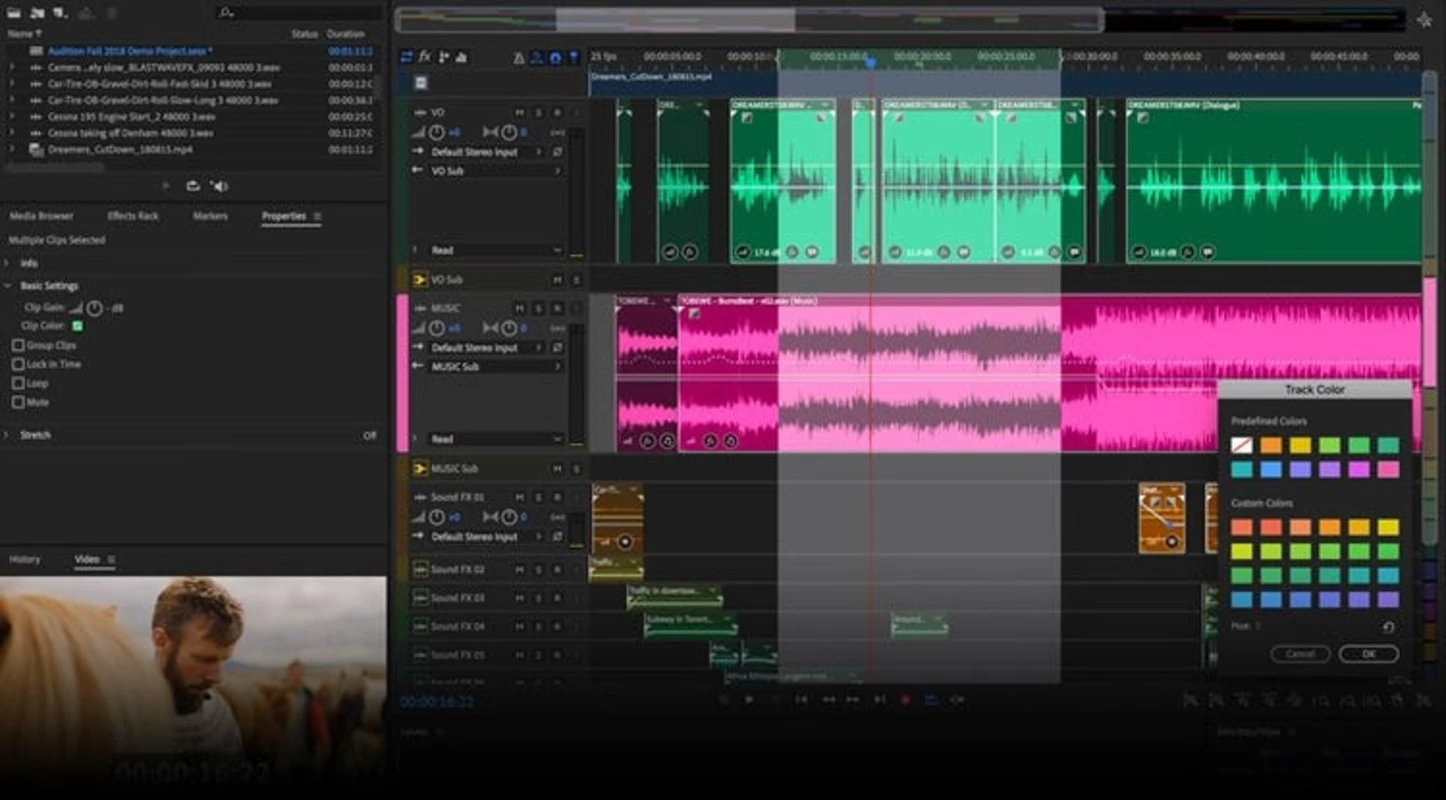
Adobe Audition 2026 includes two main editing spaces: Waveform view and Multitrack view. Waveform view is suited to destructive edits on a single audio file, such as cutting, normalising, applying noise reduction, or repairing specific problems. Multitrack view is non-destructive and is used to combine voice, music, ambience, effects, and other audio elements across multiple tracks.
The application provides detailed tools for audio restoration. Users can reduce background noise, remove clicks and pops, manage hum, and make problem recordings more usable when the source material allows it. Spectral frequency editing is one of its recognised strengths, allowing unwanted sounds to be selected visually by frequency and time rather than only by waveform shape.
Adobe Audition 2026 also includes a broad set of effects for equalisation, dynamics, reverb, delay, modulation, stereo imaging, pitch adjustment, and mastering-style processing. Effects can be applied directly in waveform editing or placed in an effects rack for flexible adjustment. In multitrack sessions, clips and tracks can be adjusted with volume automation, panning, fades, sends, and effect chains.
For spoken-word production, the software supports common tasks such as dialogue editing, podcast assembly, voice-over cleanup, loudness matching, and mix preparation. Tools for markers, clip grouping, time selection, batch processing, and file organisation help manage longer recordings and repeated editing tasks.
How does Adobe Audition 2026 work?
Adobe Audition 2026 works by importing or recording audio into a project, then editing it either as a single file or as part of a multitrack session. In waveform editing, changes are applied to the audio file itself, making it appropriate for detailed repair, format conversion, and final processing. In multitrack editing, the original files remain separate while the session stores clip positions, fades, automation, and mix settings.
A typical workflow starts with recording or importing source files. The user can remove unwanted sections, clean up noise, adjust levels, and add markers for navigation. In a multitrack session, separate clips can be arranged on different tracks, with independent processing for narration, interviews, music, effects, or room tone. Once the session is complete, Audition can mix the project down to a finished audio file.
The software includes visual feedback through waveform displays, spectral displays, meters, and analysis tools. These views help users identify clipping, silence, frequency problems, and inconsistent levels. For more controlled output, loudness tools can help prepare audio to meet specific delivery requirements when those targets are known.
Adobe Audition 2026 supports plug-in based workflows through common audio plug-in formats, depending on the platform and configuration. This allows users to expand the built-in processing options with compatible third-party audio effects where needed.
Who is Adobe Audition 2026 for?
Adobe Audition 2026 is intended for creators and production teams that need accurate control over recorded audio. It is suitable for podcast editors, voice-over producers, video editors, sound designers, musicians, educators, and content teams that regularly work with spoken word, music, or mixed audio assets.
The software is especially useful when recordings need cleanup before publication. Interviews captured in imperfect environments, narration with mouth clicks, audio with background noise, and video soundtracks requiring level balancing can all benefit from Audition’s editing and restoration tools. It is also appropriate for users who need a dedicated audio workspace rather than basic audio controls inside a video editor.
Beginners can use the core editing functions for trimming, fading, and exporting, but the full application has a professional toolset that may require time to learn. Users who need only very simple recording or one-off edits may find the range of panels, effects, meters, and session options more advanced than necessary.
Is Adobe Audition 2026 safe to use?
Adobe Audition 2026 is a legitimate Adobe desktop application when obtained from Adobe or another trusted distribution source. As with any professional software, users should avoid unofficial installers, modified packages, or unknown download links because they may include unwanted changes or security risks.
The application may require an Adobe account and desktop licensing components depending on how it is installed and activated. Users should review Adobe’s current license terms, privacy information, and system requirements before installation, especially in managed business or education environments.
Audio projects can contain sensitive voice recordings, interviews, client material, and unpublished media. For that reason, users should store session files securely, manage shared assets carefully, and confirm export settings before distributing final audio. Adobe Audition 2026 provides the production tools, but safe handling of recorded content also depends on user workflow, storage, and access controls.
What are the pros and cons of Adobe Audition 2026?
What are the best free alternatives to Adobe Audition 2026?


What does Adobe Audition 2026 look like? Screenshots