
DAEMON Tools Ultra is an advanced Windows application built for people who work with disk images, virtual drives, and system recovery media. It combines virtual drive emulation with image creation and management, plus tools that support backups, bootable USB creation, and performance-oriented storage options.
It is most relevant in practical situations where ISO and other image files need to be mounted quickly, where recovery USB drives must be prepared reliably, or where virtual disks are used to organize and protect data. The feature set goes well beyond basic mounting, which is the main reason it is often evaluated as an “all-in-one” imaging suite.
The value of the program depends on the use case. For simple ISO mounting, it may be more than necessary. For users who routinely manage images, maintain recovery tools, or need virtual storage options in a controlled workflow, it is designed to cover those requirements in one place.
What Is DAEMON Tools Ultra?
DAEMON Tools Ultra is imaging software focused on virtual drive emulation and disk image handling. Its core purpose is to allow image files to behave like real drives inside Windows, so content can be accessed without burning discs or relying on physical optical media.
The program addresses several common problems:
-
Accessing ISO and other image formats instantly, without writing them to discs
-
Working with multiple virtual drive types for compatibility with different images and software
-
Creating images from discs or selected files for archiving and organization
-
Preparing bootable USB devices for recovery, troubleshooting, or installation workflows
-
Managing data protection through image-based backups and encrypted containers
-
Improving certain workloads with RAM-based storage in scenarios where speed matters
In short, DAEMON Tools Ultra is positioned for users who want consistent tools for imaging, virtual storage, and recovery tasks, rather than a single-feature utility.
Core Focus and Teaching Approach
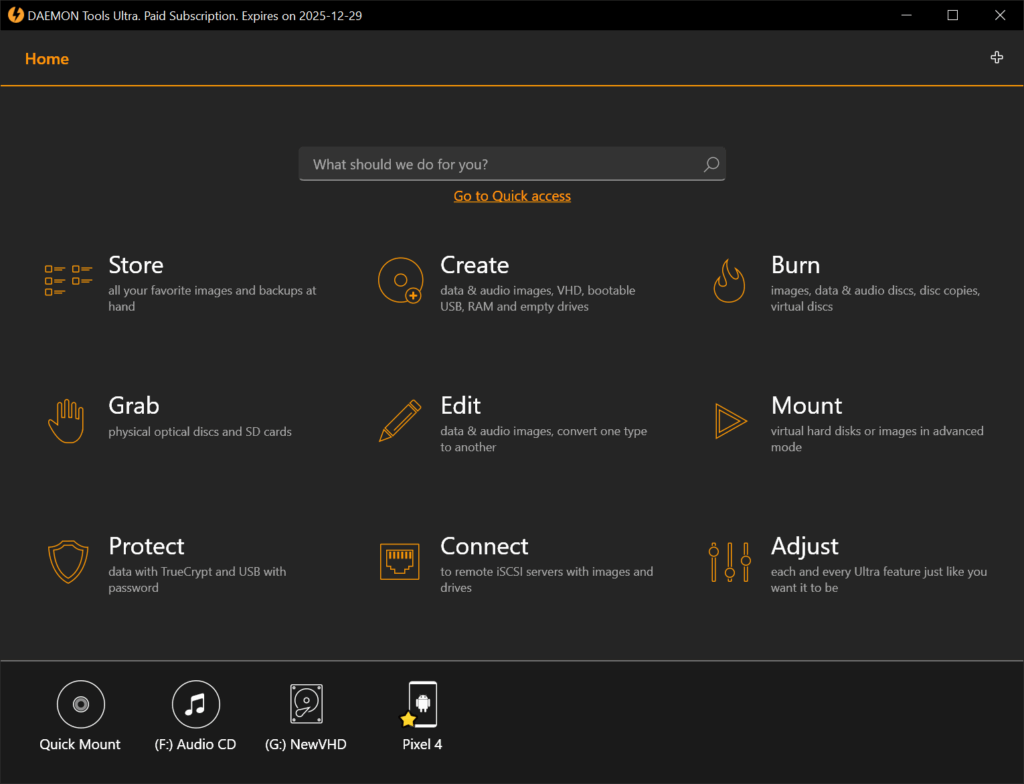
DAEMON Tools Ultra is built around task-based workflows. Instead of forcing users into a single linear process, it provides multiple “wizards” and utilities that map to real tasks: mount an image, create an image, convert a format, build a bootable USB, schedule a backup, or create a RAM disk.
A few design choices stand out in practical use:
-
Workflow orientation: Most functions are framed as outcomes, not theory.
-
Control where it matters: The software exposes configuration options that affect compatibility, such as drive emulation type and boot mode.
-
Efficiency features: The ability to run more than one wizard at the same time supports real working habits, especially when handling large images or long backup jobs.
-
Interface modernization: Recent updates emphasize stability and a Windows-aligned UI style, which matters for day-to-day usability in a tool used frequently.
This approach favors repeatable execution. The software is not limited to one narrow scenario; it is meant to support a toolkit-style workflow that grows with the user’s needs.
What’s Included in the Program
DAEMON Tools Ultra combines multiple feature categories. The following summary rewrites the provided capabilities into practical groupings.
Imaging and Mounting Tools
The program supports mounting a wide range of image files, including virtual hard disk-style images in addition to traditional optical disc formats. This is important for users dealing with mixed archives created by different tools.
Core imaging functions include:
-
Mounting many image formats, including those associated with virtual hard disks
-
Creating images from physical discs, selected files, and audio tracks
-
Managing virtual drives using multiple emulation types (DT, SCSI, IDE, and HDD)
-
Editing and organizing images with tools to convert, compress, split, and protect files
-
Burning images when physical media is still required, while maintaining image-based workflows
This area is the foundation of the product. For many users, consistent mounting behavior and format support are the primary reasons to use a suite like this.
Ultra-Level Workflow Features
Beyond the basics, DAEMON Tools Ultra includes convenience and workflow functions designed for frequent use:
-
Running multiple wizards at the same time to reduce waiting between tasks
-
A quick mounting approach that reduces the need to manually manage device creation
-
A desktop gadget option (noted as part of the feature set) for drive and setting control
-
GameSpace-style metadata and image context features for users who mount game images and want additional information tied to mounted content
These features are not critical for every user, but they can improve daily efficiency when the software is used repeatedly rather than occasionally.
Backup and Automation
DAEMON Tools Ultra includes a backup system that stores data into image-based containers, including virtual hard disks and encrypted containers.
Backup-related capabilities include:
-
Backing up files into disk images, VHD-style containers, or protected containers
-
Automating backup tasks and adjusting them over time
-
Scheduling backups to run on defined intervals
-
Email notifications to monitor backup progress and completion
This is most useful when the goal is a self-contained archive format rather than a standard folder-based copy. It can also be relevant when users prefer image containers for portability or organization.
Bootable USB Device Creation
The bootable USB functionality supports system recovery and installation workflows. It is designed for creating reusable, durable recovery media without relying on optical discs.
Bootable USB tools include:
-
Writing bootable images to USB drives with a simple workflow
-
Supporting UEFI and BIOS boot modes
-
Supporting GPT and MBR partition schemes
-
Creating Linux recovery USB drives and Windows recovery USB drives
-
Options that include DD-mode writing and support for large FAT32 bootable images for Linux (noted in version feature history)
This feature set is relevant for system administrators, technicians, and power users who maintain recovery media and need predictable results across different hardware.
RAM Disks for Performance-Oriented Use
RAM disks allocate a portion of system memory as a high-speed virtual disk. This can improve performance for certain temporary workloads, especially when many small files are created and deleted.
RAM disk capabilities include:
-
Creating and mounting RAM disks using system memory
-
Placing temporary files in fast storage to improve responsiveness for specific tasks
-
Reducing disk fragmentation caused by temporary-file churn
-
Supporting both volatile RAM disks (cleared on restart) and persistent options (designed to retain state)
This is not universally beneficial. It is most useful for controlled workflows where the user understands what should or should not live in RAM-based storage.
Virtual Hard Disks and Protected Containers
DAEMON Tools Ultra includes tools for virtual hard disks and encrypted containers designed to protect data and support multi-OS storage approaches.
Included capabilities:
-
Creating and mounting different types of virtual hard disks
-
Using virtual disks for data organization or multi-OS scenarios
-
Using encrypted containers to protect sensitive files
-
Mounting containers created elsewhere, including TrueCrypt-style containers, and supporting creation wizards for alternatives (as noted in version history)
This feature set is typically evaluated by users who want a portable, mountable “vault” for data that remains separate from the main file system.
Virtual Burner
The virtual burner simulates a writable drive to support image-based burning workflows without physical discs.
Practical use cases include:
-
Burning files to images instead of discs
-
Testing custom disc layouts before committing to physical media
-
Reducing wear on optical drives
-
Using the writable virtual drive alongside other compatible applications
This feature is most relevant where disc images are still part of a workflow, but physical media is not desirable for everyday testing.
iSCSI and USB Sharing
The program also includes an iSCSI feature set that supports connecting to remote devices and storage resources.
Capabilities include:
-
Connecting to USB devices using an upgraded iSCSI approach
-
Working with remote VHDs, images, USB devices, and optical drives
-
Connecting to iSCSI targets provided by DAEMON Tools or third-party servers
This area is typically aimed at more advanced environments where remote access and shared device workflows matter.
Key Skills and Outcomes
DAEMON Tools Ultra supports practical skills that translate directly into real tasks:
-
Managing and organizing image libraries efficiently
-
Mounting images with compatibility awareness based on drive emulation type
-
Creating bootable USB drives for recovery and maintenance with correct boot mode and partition scheme choices
-
Building a repeatable backup routine using image containers and scheduling
-
Using virtual hard disks and encrypted containers to compartmentalize sensitive or structured data
-
Applying RAM disks in controlled scenarios to improve performance for temporary workflows
The realistic outcome is improved control over imaging and recovery workflows. The software provides tools; the results depend on how consistently those tools are applied.
Who This Program Is Designed For
DAEMON Tools Ultra is best suited for:
-
IT support staff and technicians maintaining recovery media and system images
-
Power users who keep OS installers, recovery tools, or archives as images
-
Developers and testers who need quick access to image-based distributions
-
Users managing large ISO libraries who want consistent mounting behavior and organization
-
People who want image-based backups or container-based storage that can be mounted when needed
-
Advanced users who benefit from iSCSI, remote storage workflows, or device sharing
For users who only mount an ISO occasionally, the full feature set may be unnecessary. For users who handle these tasks regularly, consolidation into one toolkit can reduce friction.
How This Program Is Different
DAEMON Tools Ultra stands apart from basic mounting utilities because it is not limited to “open an ISO and run it.” It combines multiple adjacent functions that commonly appear together in real system workflows.
Differentiators based on the provided feature set include:
-
A broad scope: imaging, mounting, conversion, burning, backups, bootable USB tools, RAM disks, and network device access
-
Multiple virtual drive emulation types, which matters when compatibility issues arise
-
Multitasking support that fits real work patterns when managing several jobs at once
-
Container-based data options, including virtual hard disks and protected containers
-
Ongoing stability and performance improvements reflected in the version notes
Version notes also indicate platform tightening: from the provided changelog, later releases specify Windows 10 or later (64-bit) support, while older references include earlier Windows versions. This distinction matters when evaluating compatibility for a specific system.
Practical Benefits and Real-World Application
In daily use, the most practical benefit is time saved and fewer moving parts. Mounting images becomes routine. Recovery USB creation becomes repeatable. Backups and containers become standardized rather than improvised.
Real-world applications include:
-
Maintaining a ready-to-use recovery USB for Windows or Linux troubleshooting
-
Storing installers and system tools as mounted images rather than physical media
-
Converting and compressing images to reduce archive size while maintaining access
-
Scheduling image-based backups for structured projects or portable archives
-
Using encrypted containers for sensitive documents that should not sit unprotected on disk
-
Applying RAM disks for temporary build or cache workflows where speed matters and persistence is not required
-
Accessing remote images or devices through iSCSI-based workflows in advanced setups
The best fit is a user who values controlled processes. The software is built for consistency more than novelty.
Final Summary
DAEMON Tools Ultra is an advanced imaging and virtual drive suite designed for Windows users who need more than basic ISO mounting. It combines image creation and management, flexible virtual drive emulation, bootable USB tools, backup scheduling, RAM disks, virtual hard disk handling, and iSCSI-based device access in one application.
Its strength is breadth with structure: the program supports practical workflows that involve recovery media, archives, protected containers, and repeatable system maintenance tasks. For users who regularly operate in those scenarios, it offers a consolidated toolkit that can reduce friction and improve reliability over time.